
Remember the first time you powered on your computer. Right out of the box, you hooked everything up, when you turned it on you heard the faint whirr of the fans running and that was it. If someone in the room was whispering it would drown out the sounds your computer was making. What does your computer sound like now? Does it sound like tiny men with pick-axes are trying to mine the steel out of your case? Does it sound like somebody left their kid inside of your computer to ride his bike with a baseball card in his spokes? Maybe it sounds like a ’78 Gemlin running pedal-to-the-floor at 57 mph with the muffler dragging on the ground behind it? Believe it or not, if your computer is running loud, there are somethings you may be able to do to narrow down the problem and possibly even fix it yourself.
The Issue
You left the office long after everyone else went home, but the Ninja Report is finally finished. You completed your research after successfully self-troubleshooting your internet problems and it’s printed and bound even after that unfortunate printer issue that you had fix yourself. Now you’re taking some time to relax with the dulcet tones of Christmas with the Chipmunks playing through your computer speakers before turning in for the night. All of sudden you jump out of your chair and duck under your desk because you’re sure a mad man with a chainsaw has just come running into your room. Once you bring yourself together and rub away those embarassing tear and snot streaks on your face, you work up the courage to take a quick peek. You then realize that there is no mad man, instead that horrible racket is coming from your computer.
First Step
The first step to taking care of this issue is to unplug and get your computer onto your desk where you can work on it. Most computers will open on the right side if you’re looking at the front, but some manufacturers like to be different, so yours may open on the left side. Either way, lay the computer down on the side that doesn’t open. This is probably the best time to tell you that if you have a laptop that is making odd noises your best bet is to have a professional look at it. There is no way that you should try taking apart a laptop, it will only lead to more problems. Remove the side panel from the computer and take a step back.
**WARNING** Before you touch anything inside of the computer, make sure you touch the metal case first. This will take care of any static electricity that you have built up in your body and let it dissipate into the grounded case itself. The arc of a static discharge can damage computer components.
Now that that’s out of the way we can get started.
Dust is the Devil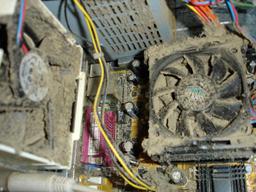
Excessive heat is hard on your computer. Your computer case is designed to be a small wind tunnel. Most computers will have a fan near the bottom on the front of the computer, a fan on the Motherboard near the center of the computer and sometimes two fans on the back of the computer. The idea is to draw in cool air from the floor and run it over the components and then push the warm air back out. Now, take a look at the inside of your computer, does it look like the air has to travel around or through 4 inches of dust that’s caked over every possible surface? If so, you my friend, have a problem with heat (among other things that could be solved with a vacuum cleaner and a new filter on your air conditioner). An over-abundance of heat will cause the fans to run constantly and at full speed, that’s the reason why your computer sounds like a 747 trying to take off. You can get rid of this dust safely with either an air compressor or a two-pack of canned air from your nearest Office Depot. You want to pay special attention to the fans and any vents on the front or back of the computer.
Listening is Key
Once you’re sure that dust is no longer an issue, its time to turn your computer back on. Leave the case open and the computer laying on its side. Obviously I can’t make any guarantees, but I’m at least 95% sure that plugging everything back in and running your computer while the case is open will not open a blackhole in your office and destroy the world. While the computer is coming on try to pay attention to where certain sounds are coming from. Here are a few noises that you might hear:
Clicking in the Fans – Turn off the computer and check for any foreign objects (even cables) or materials that the fan blades could be hitting, much like the baseball-card-in-the-spokes analogy earlier.
Tink-Tink from the Hard Drive – Turn off the computer and call support. This is a sure sign the the hard drive is failing and needs to be replaced. A technician may be able to save some of your data. (For more hard drive sounds check out the DriveSavers Hard Drive Simulator here.)
Rattle or Hum from Any Component – Make sure any screws are tightened down completely. Loose components can make all kinds of odd sounds once things really get moving, if they aren’t completely secure they can vibrate and make other components make noise as well.
The key is to listen to the sounds your computer is making. If you can pinpoint which component is making the sound then a technician may be able to recommend a fix without having to actually see your computer. This will surely save you some time and money.
Final Thoughts
If your computer is making any noises that are as loud as a chainsaw, you really should have that looked at. Otherwise, computers make noises, especially as they get older. A 5 year old computer is comparable to a 60 year old man when it comes to noises that they make, some of them are natural and others are…not. Keep the inside of the case clean and pay attention to what you hear and you might just avoid a disaster waiting to happen.
What other noises do you hear in your computer? In other words, what did I miss? Let me know what you think in the comments section below.
Dennis Edmondson Jr
Computing Concepts LLC


