

This will hopefully be the first of several articles covering technology terms that can be kind of confusing to people. I am hoping I can use this series to help people understand what it is they are looking at, listening to and buying. There is nothing worse than buying something from the big tech store in your town and then having to ask the little seventeen year old tech snob behind a counter how to use it. Or worse yet, your kids. This first article will discuss the newest hottest piece of tech out today: the tablet.
With the recent release, and low cost, of Amazon’s Kindle Fire, more people are getting tablets now than ever before. This has led to people asking several questions. What is a tablet for? Which tablet should I buy? Why doesn’t my tablet do everything his/her tablet does? I am going to try to help answer those questions here. I have broken down the tablet craze into four categories.
The Tech Toy
I know, I know. All tablets are tech toys, just stick with me here. This category is aimed at kids, I am talking toddlers here. There are two that are at the forefront of this group. The LeapPad (made by Leapfrog) and the Innotab (made by VTech) are the two most popular and recognized child-oriented tablets out right now. Yes, they are used primarily to play games, but if you look at the library of games, they are learning games. The kids learn math, reading, colors and numerous other skills while learning to use a touch screen tablet at the same time. My son has the Innotab and loves it. Why? Of course, part of it is because of the games, but he calls it his iPad, because it is the same physical size as his grandmothers’ iPad. Any tool we can use to teach our children basic skills and technology at the same time is a win-win in my book.
The E-Reader
This group and the next group can be very confusing. I almost put them together, but thought it would be easier this way. This set of tablets includes just about any device that will read electronic books (e-books). While the two most popular are the Barnes and Noble Nook and the Amazon Kindle, you can find e-reader devices just about anywhere. Several companies have created these devices and sell then incredibly cheap. I believe I saw one in Big Lots for about $65. These devices are only used for reading books and magazines. The brand name units might have wireless or even 3G connections so you can access the book store from anywhere. Some boast color, or e-ink. E-ink is a really cool display that looks like a paper page in a book. A nice effect for an e-reader. This is another handy tool that is being slowly replaced by the next group.
The E-Reader+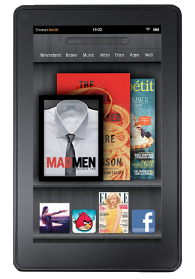
Not sure if this category has a real name or not, but this title is accurate, I think. As far as I know there only two products in this group right now. They are the Barnes and Noble Nook Color Tablet and the Amazon Kindle Fire. Both of these units are very nice and do several things really well. Since both of the companies that make these devices are primarily book sellers, both devices are primarily e-readers. They both use the same book and book store interfaces as their plain e-reader brothers, but add full color to the experience. The biggest difference these units offer is the introduction of apps. I have not had my hands on the Nook Tablet yet, but I have played with the Kindle Fire. It comes with a couple of apps preinstalled, so to speak. I say it that way because the Facebook ‘app’ is nothing more than a fancy icon that takes you to the Facebook mobile page. The Fire also offers a pretty slick web browser called ‘Silk’. It is a pretty snappy web browser that is able to use all of the current web plug-ins (Java, Flash, etc.). As I said earlier, these units are still primarily e-readers; they just add some extra functionality.
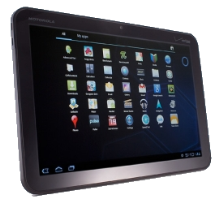 The Full Tablet
OK, here is the fun group. This is the group that includes the big dogs of the tablet world. Here is where you will find the Motorola XOOM, the Samsung Galaxy Tab, the Acer Iconia and the one that started it all, the Apple iPad. With a tablet from this category you can do anything the tablets from the other categories can and more. These tablets can run a version of Office, either the Microsoft version or another version. You can print from these models. On most of them you can take pictures and movies. You can even make video calls using these tablets. You can download all kinds of apps with these as well. You can download educational games and apps, e-reader apps and many, many others. There is even an app that can tell you where the cheapest gas is in your area. This class of tablet can also be used in the business world. All of the models I have listed for this group, plus many others, can be attached to a projector to make large presentations. They are wonderful for taking notes in a meeting. It is also very handy to be able to switch over to a full functioning web browser for research on the fly, while taking notes. This is the group that is slowly making the laptop a thing of the past.
I hope this has helped with understanding what these tablets are and what they are capable of. Any tablet can be a useful tool, as long as you are using it for what it was made for. I also hope this will help settle the Kindle Fire vs. iPad argument. They are both tablets, yes, but they are also made to accomplish two different things. If you find yourself trying to decide between the Fire and iPad, just ask yourself what it is you want to do. Just want to read books and have an option of getting to the web? The Fire is for you. Want to be able to do just about everything a laptop can do, plus be able to download an app that lets you read books, for those long plane rides? The iPad is for you. These same types of questions can be used to decide between any of the four categories of tablets. Armed with this information and questions, you should be able to make an educated decision on which tablet is for you.
If you have any questions or comments, please leave them below. I look forward to hearing your ideas on what tablets are.
Michael Morgan, MCP


