
Out of all of the programs in the Microsoft Office Suite, I think I like Excel the most. I get more use out of that one program than probably any other application on my computer with the exception of Internet Explorer. I will use Excel for keeping lists of items, keeping running totals of expenses, balancing my checkbook, and even tracking my stats in Golf. I’ve come up with a short list of things (in no particular order) that I think everyone should know how to do in Excel to save themselves a little time. Take a look and let me know what you think.
Copy Formatting
So you’ve spent the last 10 minutes finding just the right cell color, font type, font size, text color, and alignment. That’s great but you’ve only formatted one cell out of the several hundred in your worksheet. Now what do you do? Use the Copy Format button. It’s the highlighted paint brush in the picture below. Select the cell that has your formatting, click the Copy Format Button, click on the cell that you’d like to copy the format to. If there are multiple cells that you need to copy this formatting to then Double-Click the Copy Format Button, now you will be able to keep clicking on cells and making their format match the format of your selected cell. Pretty cool right?
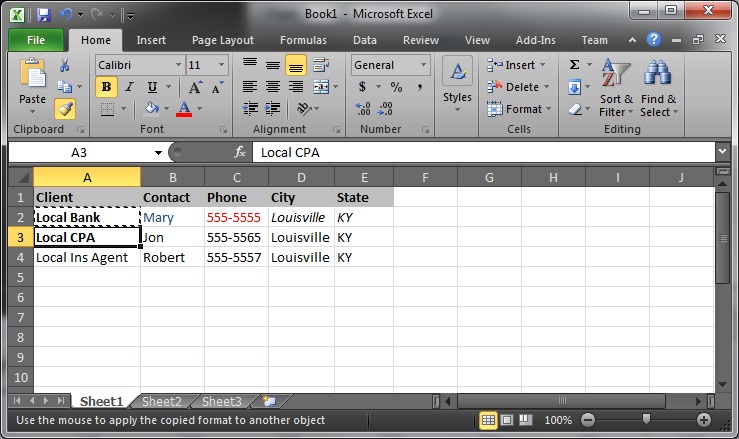
Well check this out: If you highlight a row of cells you can copy the formatting down to the next row using the same button.
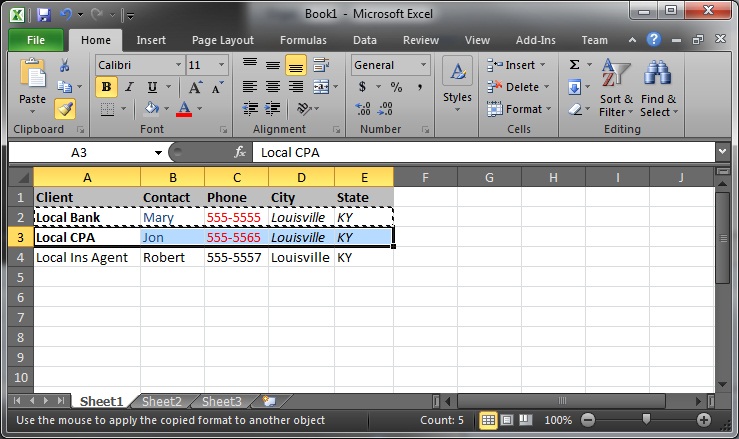
Now go forth and multiply thy formats! NO! Wait, not yet, there’s more on the next page.


